
Social Media Picker and Online Scheduler | Case Study
A desktop-first workflow for preparing reviewed photography posts, creating and improving captions, scheduling them locally or online, and publishing to multiple social platforms with operational checks.
Scope note: this page documents the implemented workflow and verified behavior. It intentionally does not publish API tokens, SMTP secrets, full source files, or credential-bearing configuration.
0. Section Map
- 1: Problem context and objective.
- 2: Workflow logic from image selection to posting.
- 3: Local scheduler architecture.
- 4: Online scheduler architecture.
- 5: Platform rules, per-post media splitting, and X boundary.
- 6: Reliability handling: token reminders, partial runs, fatal errors, email summaries, and cleanup.
- 7: UI evidence from the implemented tool.
- 8: Code exposure decision for a public case study.
1. Problem Context And Objective
Posting photography sets manually across several platforms creates repeated work and repeated risk: captions can drift, platform selections can be missed, schedules depend on the computer being on, and partial failures are hard to track cleanly.
Objective: keep the creative review step manual, but automate the repetitive operational work around scheduling, publishing, logging, email reporting, and cleanup.
- Prepare a single reviewed post queue from selected source images through deliberate copy or move actions.
- Create a quality caption, a local draft, or an improved draft from a caption brief, images, optional blog URL, and stored facts; review or edit it before scheduling.
- Post the same approved content at the same scheduled time across selected platforms.
- Keep history and restore controls so drafts and posted records remain traceable.
- Support both local Windows scheduling and online cron scheduling.
2. Workflow Logic
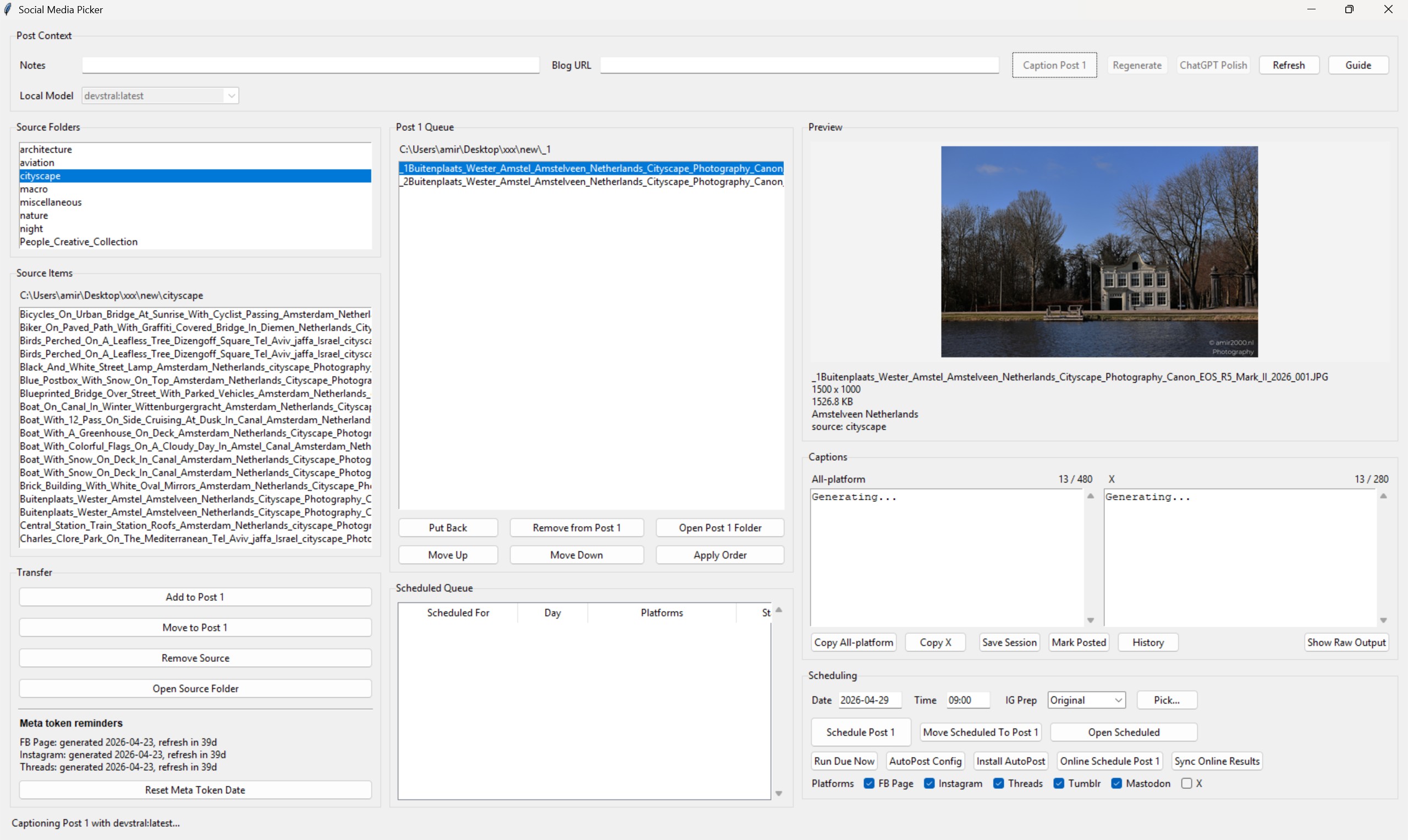
The workflow is deliberately staged. The tool does not immediately post from a folder scan. It first builds a reviewed Post 1 queue, then saves a scheduled record with captions, selected platforms, image references, and status fields.
- Select a source folder and copy or move chosen images into the Post 1 queue.
- Review the preview and file order; the queue can be reordered, restored to its remembered source, or cleaned deliberately.
- Add a caption brief and optional blog URL, then create a Quality Caption or Local Draft and optionally Improve Draft. The all-platform and X captions remain editable before scheduling.
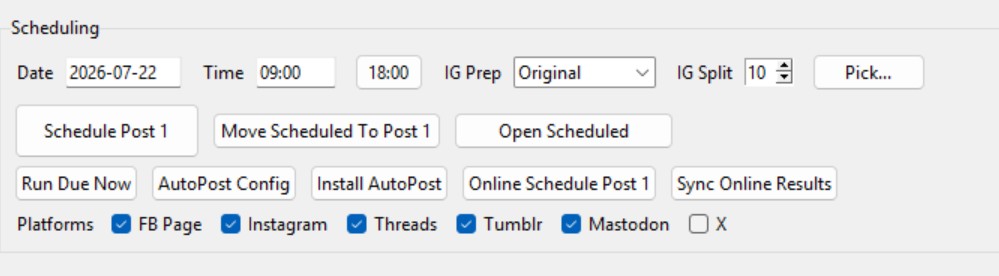
- Choose date, time, Instagram preparation mode, per-post Instagram split size, and platforms.
- Schedule locally or export to the online scheduler.
- Runner processes due jobs and records per-platform results.
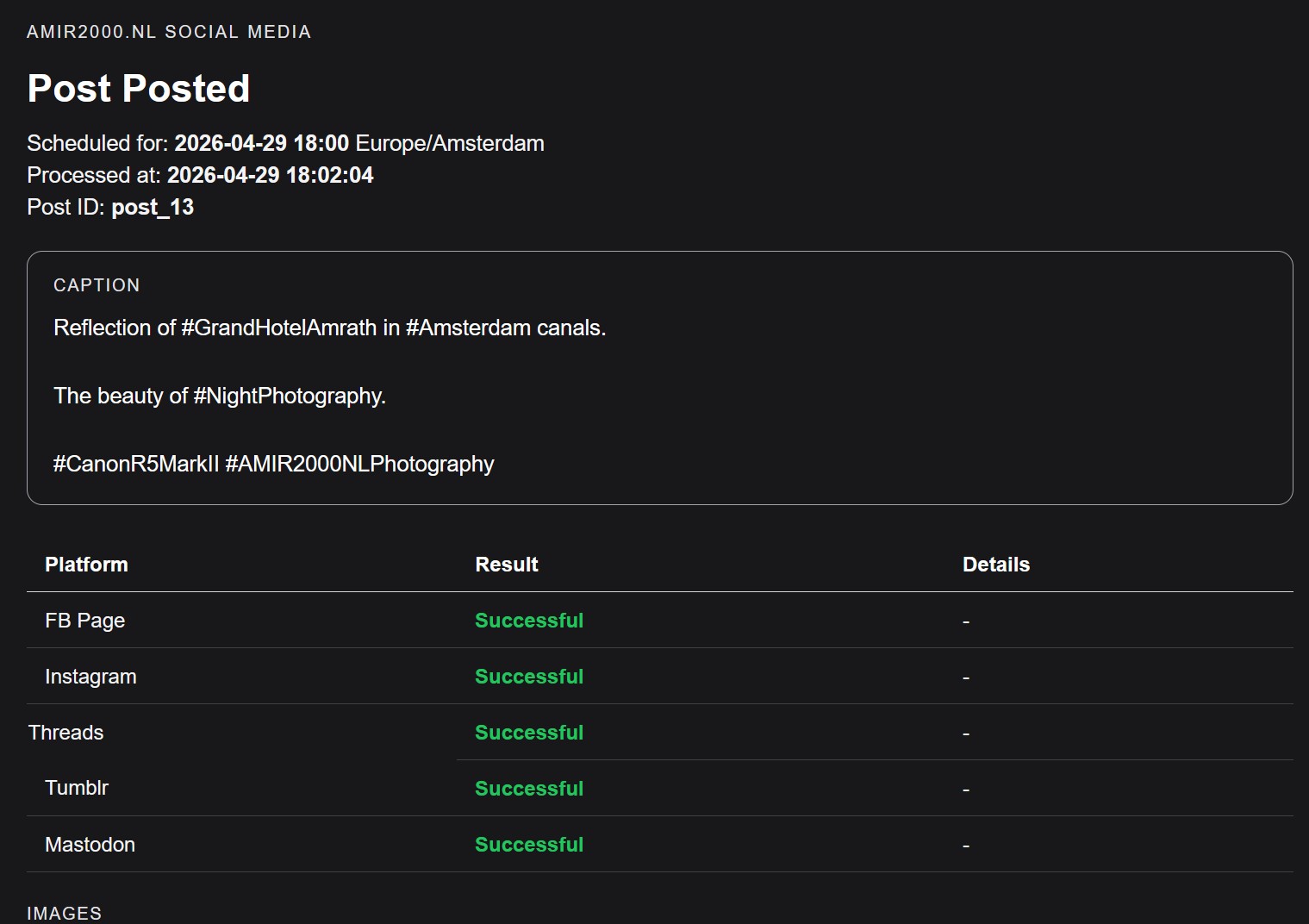
- Email summary is sent after processing.
- Terminal online jobs are archived and their temporary online media is removed.
3. Local Scheduler Architecture
The local workflow keeps the full desktop experience available through the Social Media Picker and a Windows scheduled task.
- UI:
social_media_picker.py, a Tkinter desktop application. - Runner:
autopost_runner.py, used by the local AutoPost task. - History:
social_media_history.db, used for saved sessions, scheduled records, posted records, source references, and restore flows. - Launcher:
Social Media Picker.vbs, used to open the app without the extra PowerShell window. - Private configuration: local and online SMTP or platform credentials remain in their private, environment-specific configuration and are not part of this case study.
Current caption controls provide a quality workflow, a local draft workflow, and an improvement workflow. Each leaves the all-platform and X captions editable, so the creative approval step remains manual. Confirmed local behavior also includes session save/restore, history view, scheduled posting, and HTML email summaries after post runs.
4. Online Scheduler Architecture
The online scheduler removes the requirement that the local computer stays on at the posting time. The desktop app exports a queue package, uploads it by FTP, and a Hostinger PHP cron processes due items.
- Online runner:
cron.phpunder the onlinesocial_autopostfolder. - Queue format: one JSON file per scheduled post under
data/queue. - Timezone: scheduled entries carry
Europe/Amsterdam. - Notifications: online SMTP summaries use private configuration and report platform-level results.
- Cleanup: posted entries move to
data/archive/posted; terminal attention entries move todata/archive/needs_attention. Matching temporarymedia/post_IDfolders are removed in either terminal case. - Access control: public browsing of scheduler internals is blocked with
.htaccessrules.
The online queue carries only the operational data needed for the run: schedule time, timezone, selected platforms, captions, Instagram preparation and split settings, media references, source references, and platform results.
{
  "id": "post_ID",
  "local_post_id": 0,
  "status": "scheduled",
  "scheduled_for": "YYYY-MM-DD HH:MM",
  "timezone": "Europe/Amsterdam",
  "platforms": ["FB Page", "Instagram", "Threads", "Tumblr", "Mastodon"],
  "instagram_mode": "Original",
  "instagram_split_count": 10,
  "media": [
    {
      "filename": "image.jpg",
      "relative_path": "media/post_ID/image.jpg",
      "public_url": "https://www.amir2000.nl/..."
    }
  ],
  "platform_results": {}
}
5. Platform Rules And Boundaries
The confirmed auto-post targets are FB Page, Instagram, Threads, Tumblr, and Mastodon. X remains visible in the UI but intentionally unchecked and disabled for auto-posting because automated posting requires paid API access.
- FB Page: posts through the configured page token flow.
- Instagram: can prepare Original, Auto, 4:5 Crop, or 1:1 Blur assets before its container creation, readiness wait, and publish flow.
- Threads: uses Threads API container/publish flow.
- Tumblr: uses Tumblr API posting and can be retried after transient failures.
- Mastodon: uploads media and posts status through the configured instance.
Split rules currently implemented:
- Instagram: each scheduled post can choose an
IG Splitsize from 1 to 10 images per part. Larger sets are split and numbered without changing the limits of other platforms. - Threads: up to 20 images per post.
- Mastodon: up to 4 images per post, so larger sets are split into numbered parts.
- X: split limit exists in code, but X auto-posting is disabled.
6. Reliability And Failure Handling
The scheduler treats every platform result separately instead of assuming that a post is all-or-nothing. This matters because real platform APIs can return transient failures or token/authentication errors.
- Partial runs: already successful platforms are kept; unfinished or retryable work can be retried.
- Meta token reminders: the picker records operator-maintained token generation dates and shows expiry reminders before Instagram or Threads credentials become an operational problem. This is a reminder, not automatic token refresh.
- Fatal Meta errors: expired or unrecoverable Meta token failures are marked as
needs_attentionso the scheduler does not retry forever. - Tumblr retry example: a confirmed online run became
partialfirst, then completed successfully on the next cron pass. - Email summaries: each run can produce an HTML email summary with platform-level results.
- Cleanup discipline: terminal online states, including
postedandneeds_attention, archive their JSON and remove temporary media.
A documented 19 July 2026 scheduled run posted successfully to all selected targets. Its results show Instagram completing in two parts and Mastodon completing in four parts, with the final record marked posted at 18:10:06 Europe/Amsterdam.
7. UI Evidence
The screenshots document the current main operating surface and its scheduling controls, including local scheduling, online scheduling and result sync, Instagram preparation, per-post IG Split, and platform selection.
8. Code Exposure Decision
This public case study should not include the full code. The full implementation contains configuration paths, platform integration details, and operational wiring that should stay private or be shared only in a cleaned repository.
Best public approach:
- Show architecture and data flow.
- Show selected sanitized snippets such as queue JSON shape or function responsibilities.
- Name the important files and modules.
- Explain failure handling, retry strategy, and cleanup rules.
- Keep credentials, tokens, SMTP config, full source files, and unredacted local paths out of the public page.
9. Outcome
- One reviewed post can be scheduled for multiple platforms with the same approved content.
- Local scheduling works through the Windows AutoPost task.
- Online scheduling works through Hostinger cron when the local computer is off.
- Email summaries report success, partial, or attention states.
- Terminal online posts are archived and temporary online media is cleaned up.
Captioning remains reviewable and editable before scheduling: the tool provides quality, local-draft, and improvement workflows, but it does not remove the photographer's approval step. X auto-posting remains intentionally disabled because automated posting requires paid API access.