
Amir2000 Image Automation V1.0 | Case Study
Automate high-volume photo sets into deterministic filenames, review-ready metadata, and publish-ready website assets while keeping a mandatory human approval gate.
- Automates end-to-end image processing from intake to publish-ready assets.
- Enforces review-first quality gates before any publish action.
- Reduces manual edits with deterministic naming, metadata guardrails, and rollback-safe runs.
0. Section Map (What Each Point Means)
This map explains the purpose of each numbered section so any reader can quickly understand where to find business, product, and engineering context.
- 1: Executive summary and delivery snapshot.
- 1A: V1.0 status, metadata proof, and ML foundation.
- 1B: Live catalog data snapshot for scale, QC distribution, and camera mix.
- 2: Problem landscape and operational pain points.
- 3: Objectives and real-world constraints.
- 4: Solution architecture at a glance.
- 5: End-to-end workflow, including post-review publish path.
- 6: Operator UX and quality gate behavior.
- 7: Engineering decisions and reliability safeguards.
- 8: Stack boundaries and technical ownership.
- 9: Tradeoffs, roadmap, and metadata-quality ML planning.
- 10: Deep-dive documentation map for implementation details.
Why this matters by audience:
- Recruiters: clear ownership story from problem to shipped workflow.
- Managers: explicit risk controls, quality gate, and operational maintainability.
- Developers: concrete architecture, modules, state model, and extension points.
1. Executive Summary
The automation solves a practical production problem: moving from manual, error-prone image publishing to a repeatable, auditable pipeline where every image has explicit lifecycle state in a database.
- Built as a Windows desktop workflow orchestrated by
main_set.py. - Uses routed visual evidence to suggest and refine subjects, including specialist paths for biology and aircraft.
- Improves caption, alt text, and keyword quality with duplicate rejection and evidence-first guardrails while preserving the selected subject, location, and category.
- Adds
metadata_qualityas the proof, audit, and first ML feedback table for generated metadata. - Adds row-level metadata regeneration in the review editor via Generate, without bypassing manual approval.
- Uses SQLite (
review.db) as operational truth for queue, status, and auditability. - Logs Ollama startup processor mode (GPU/CPU), context, and VRAM at app start for immediate runtime verification.
- Publishes approved assets through FTP + MySQL upsert and syncs to local mirror DB.
- Scale context: the live catalog snapshot below shows current catalog scale and quality mix; total catalog volume and automation throughput are tracked separately.
1A. V1.0 Current State
Version 1.0 moves the project from batch workflow automation into a measured metadata-quality system. The publishing path remains review-first, while generated captions, alt text, and keywords now pass through a proof layer before they are treated as upload-ready.
- Working now: multi-set intake, local subject suggestion, review-first approval, FTP upload, MySQL synchronization, and rollback-safe reruns.
- Metadata proof:
metadata_qualityrecords generated metadata, accepted upload fields, quality status, issue reasons, repair attempts, and final upload outcome. It checks structural quality, duplication, and context; the review editor remains the semantic accuracy gate. - Identifier foundation: routed general-vision, biological, and aircraft paths seek a specific species, model, or registration only when visible evidence supports it. Mixed or ambiguous sets remain available for human correction rather than being silently treated as confirmed.
- Repair boundary: automated repair rewrites caption, alt text, and keywords only. The selected subject, location, and folder/category remain under operator control.
- Quality rule: improvements must scale across the archive, not depend on one folder, one topic, or one subject.
- ML starting point: accepted, rejected, repaired, blocked, and uploaded rows become the first training/evaluation evidence for future metadata models.
1B. Live Data Snapshot (Current Catalog)
To complement the narrative, this snapshot reads live from MySQL table photos_info_revamp and shows scale,
quality mix, and camera evolution. This is intentionally a compact data view to support the story without overwhelming it.
Catalog rows
47,503
Largest QC band
Good (20,853 / 43.9%)
Top camera volume
Canon EOS R5 Mark II (20,483)
Cumulative Growth (Live)
QC Status Distribution
Camera Mix by Year (Top 5)
Interactive charts are unavailable right now. This usually means the Chart.js CDN was blocked by browser/network filtering.
Live source: photos_info_revamp. The charts show catalog evolution and quality mix, not an exact automation start date.
Latest image timestamp in the catalog: 2026-09-03 15:53:29.
2. Problem Context
Manual workflows worked for small sets, but failed at scale. The pain points were not isolated bugs; they were system-level reliability issues.
- Naming was often too generic and did not identify subject type clearly enough (for example specific flower, bird, or animal context).
- Manual batch grouping prioritized throughput but frequently missed quality consistency.
- Filename consistency, safe character handling, and collision prevention were difficult to enforce manually.
- Any correction was painful because fixing one mistake required touching multiple files/fields manually.
- No single source of truth for state transitions from import to publish.
Concrete before/after naming examples
Before (more generic naming/caption context)
After (more specific subject/location naming and cleaner metadata context)
Cosmos_pink_and_white_petals_with_bright_yellow_disk_Flower_Photography_Macro_Photography_004.JPGBooking_com_campus_Offices_Amsterdam_Netherlands_Night_Photography_001.JPG
3. Objectives And Constraints
Primary objectives:
- Deterministic naming and duplicate prevention.
- Repeatable, staged workflow with clear status transitions.
- Higher-quality naming/caption/keyword output with less generic metadata.
- Human-in-the-loop publishing decisions.
- Publish integration with existing website storage and MySQL model.
Constraints:
- Local-first operation on Windows desktop environment.
- Existing website data model and path conventions must be preserved.
- No silent production writes without manual validation.
4. Solution Overview
The system is organized as a guided multi-stage pipeline. Operational state is stored in SQLite, and publish is a deliberate final step from the review editor.
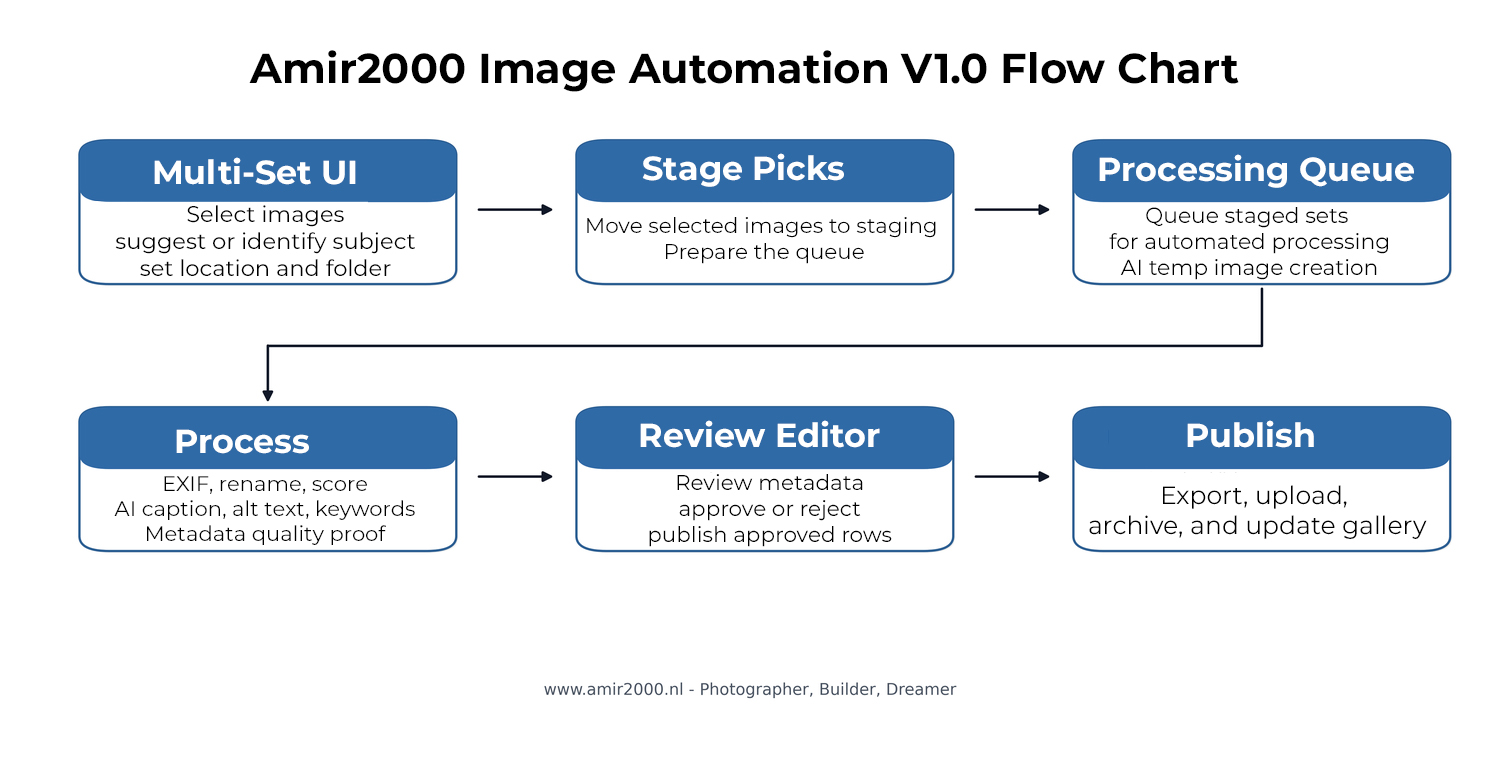
Figure 1: V1.0 flow chart from set intake through metadata proof, review, publish, and gallery update.
5. Workflow Walkthrough (Stage By Stage)
The production stage flow implemented in main_set.py:
- Validate sets: sanity checks before any data mutation.
- Prepare DB and copy to incoming: establish working context and staged inputs.
- Extract EXIF and initial metadata: seed technical metadata and base fields.
- Insert/refresh review rows: create or update
review_queuerecords. - AI quality scoring: compute quality metrics and initial quality classification.
- Resize for Ollama: generate temporary model inputs and set
ollama_path. - Caption/keywords prefill and proof: local LLM suggestions for caption, alt text, and keywords, with optional classifier hints, strict duplicate controls, bounded repair attempts,
metadata_qualityproof rows, Stage 6 timeout/quarantine safeguards, and pre-review QC report output indata/prefill_qc_last.json. Repair is limited to those metadata fields; it does not rewrite the selected subject, location, or category. - Open review editor: enter the human decision phase.

Runtime check: startup log confirms active processor mode, context, and VRAM before stage execution.
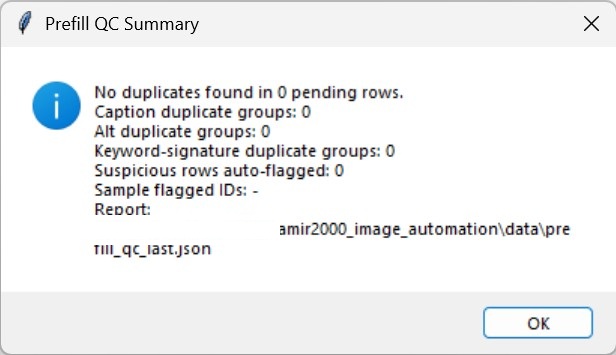
Prefill QC: duplicate and suspicious metadata checks run before the review editor opens.
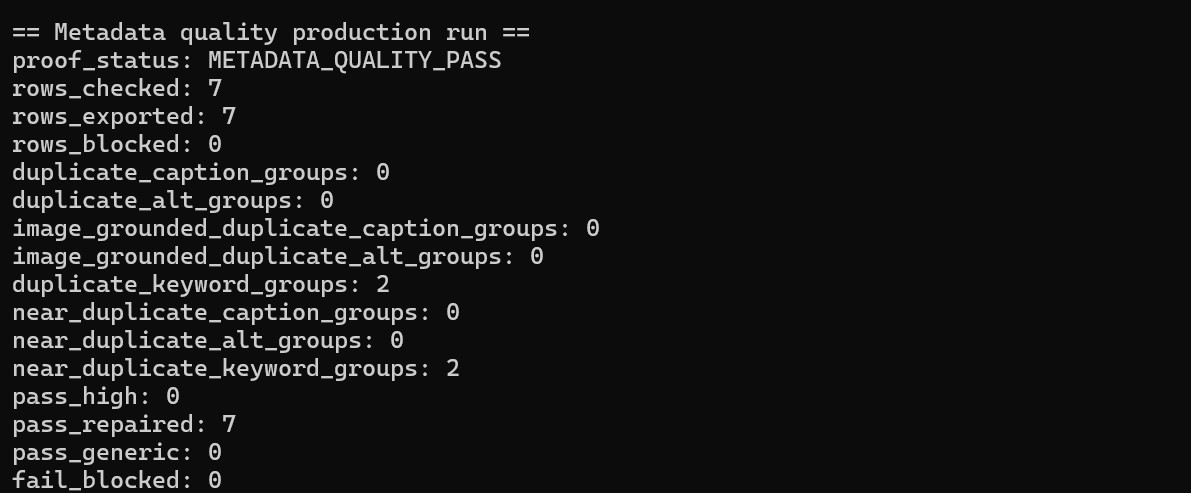
Metadata proof: accepted upload rows pass structural, duplication, and context checks after bounded repair. The operator still confirms semantic accuracy before approval.
After the review editor opens (release path):
- Review and edit each row for caption, alt text, keywords, filename, and quality fields.
- Use Generate for row-level metadata retry; regenerated text is checked against pending-row duplicates before save.
- Set each row status to Approved or Rejected based on final human judgment.
- Trigger publish for Approved rows only.
- Uploader sends full + thumbnail assets to FTP destinations.
- Tagged source images are converted to sRGB for website export; the generated full image and thumbnail embed an sRGB ICC profile while originals remain untouched.
- Uploader performs MySQL upsert by
File_Nameand syncs local mirror IDs. - On clean publish, temp Ollama paths are cleaned and final statuses are persisted.
- Operator validates logs and website output as final QA.
Correction flow is intentionally fast: when a result is not good enough, reject can reverse the item path so it can be redone cleanly for better output.
Runtime failure handling is also rollback-oriented. If a blocking error occurs (for example caption model missing), the session rollback restores files and releases reserved filenames so the run can be safely retried.
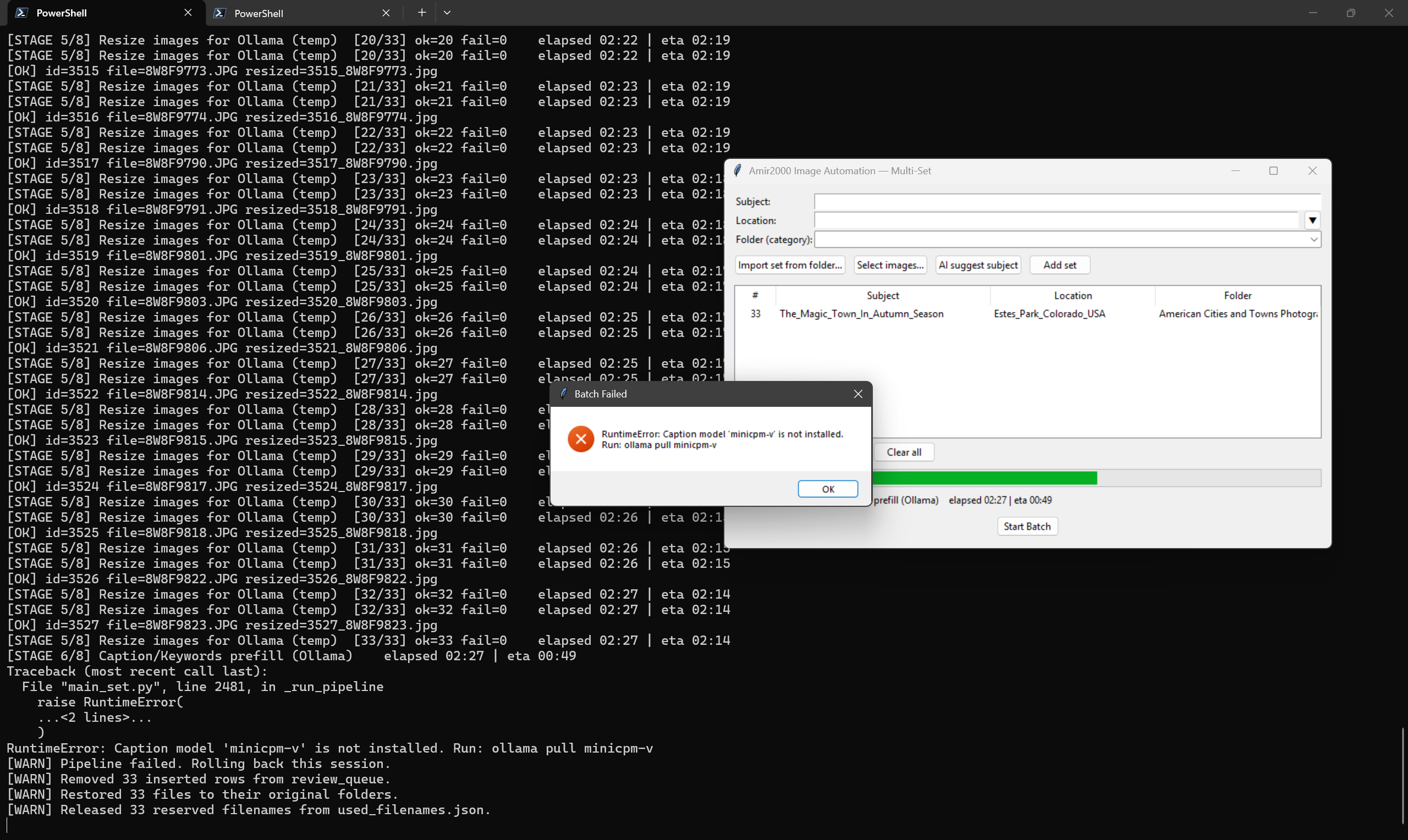
Figure 2: Real rollback event after caption-stage model error, showing session cleanup and filename reservation release.
The result is a controlled transition from raw files to reviewed records to published assets.
6. Operator Experience And Review Gate
The Multi-Set interface is designed for batch processing with visible stage progression and explicit review decisions.
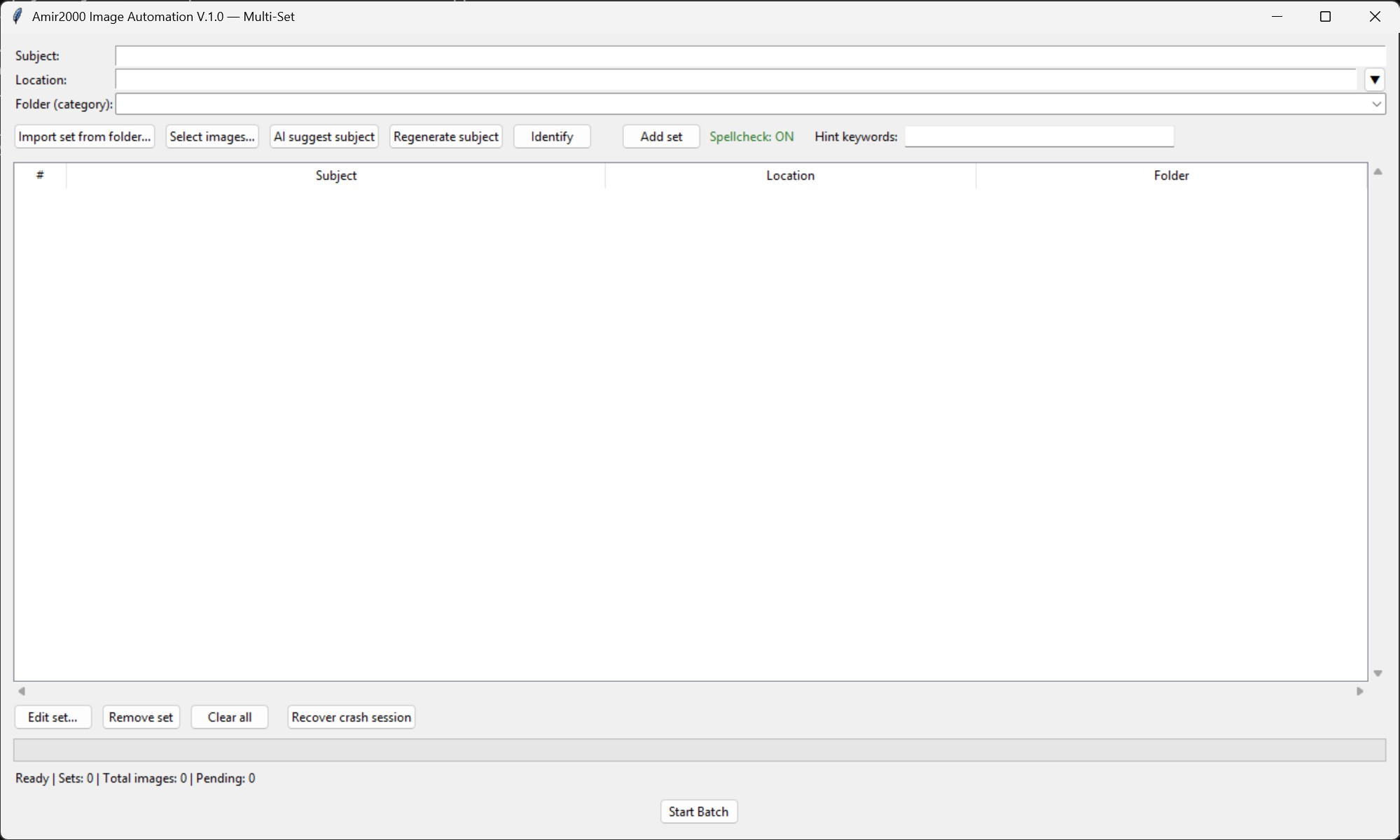
Figure 3: Multi-Set V1.0 operator UI used to build sets, run stages, and enter review workflow.
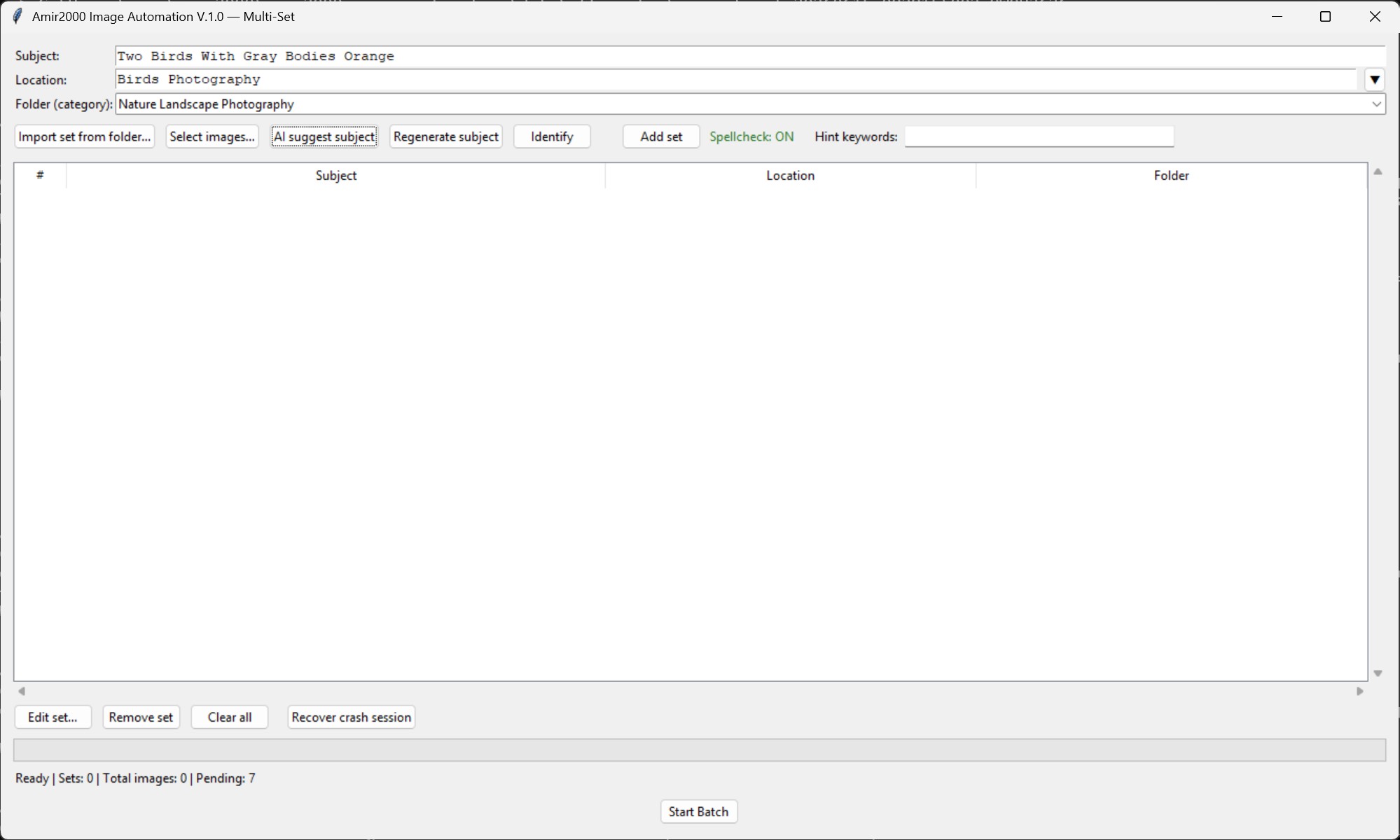
AI subject suggestion: the set subject field can be filled before adding the set to the queue.
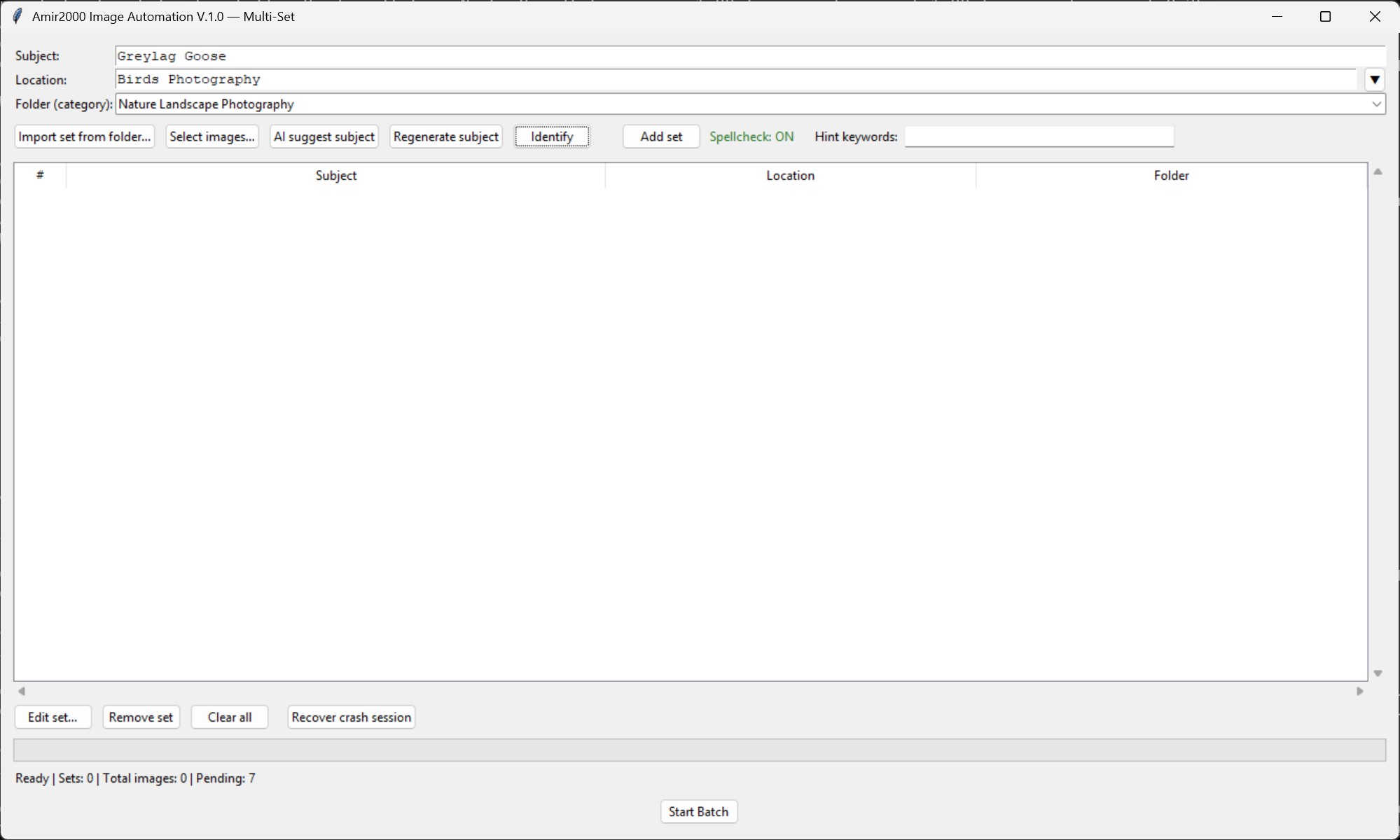
AI identify: the stricter identifier path can set a concrete shared subject when visible evidence is consistent across the selected images; mixed or ambiguous sets remain available for manual correction.
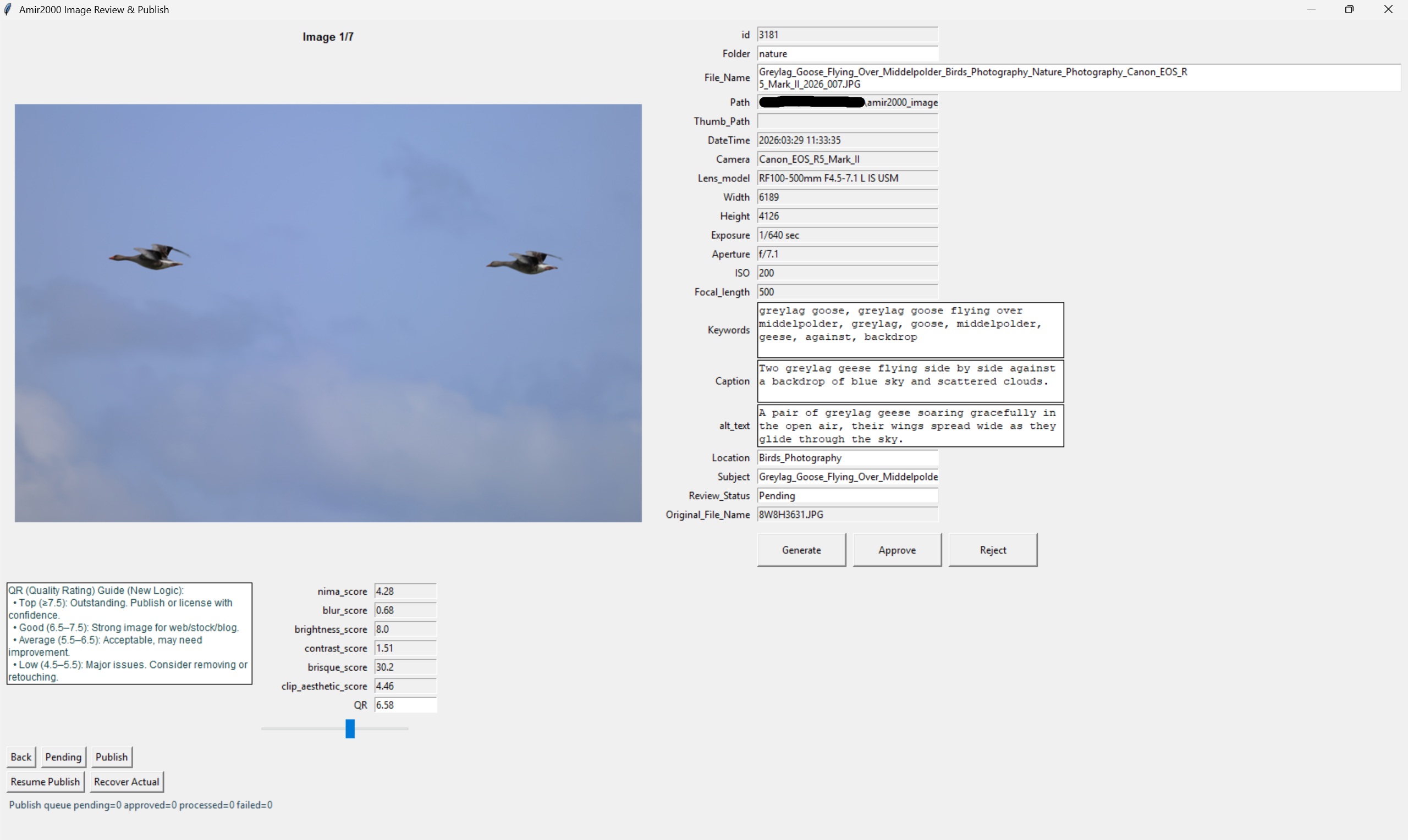
Review editor: generated metadata, quality signals, and fixed Generate/Approve/Reject controls stay visible during review.
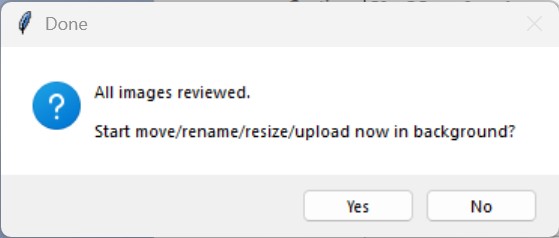
Publish prompt: upload starts only after all images are reviewed and the operator confirms the publish action.
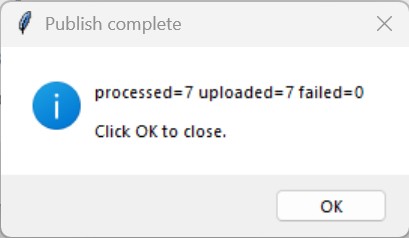
Publish complete: processed, uploaded, and failed counts are shown at the end of the publish path.
- AI output is assistive only.
- Queue management UX was improved with clearer control spacing (fewer accidental clicks between AI suggest and add-set actions).
- The multi-set window is resizable and the queue table supports scrolling so large runs can be reviewed without truncating rows.
- Crash/session continuation is operator-visible: Recover crash session restores saved sets and resolves pending files across both
incomingandstagedpaths from the last checkpoint. - Add-set stability guardrails were added: AI subject suggestion runs single-flight, and runtime callback crashes are captured in
data/crash_runtime.logfor fast diagnosis. - Review editor now includes image position context (Image n/x) to keep large approval sessions trackable.
- Review editor primary actions are isolated in a dedicated row (Generate and Approve), with secondary decisions in a separate row (Back, Reject, Pending, Publish).
- Publish completion uses one final dialog; clicking OK closes the review window.
- Caption, alt text, and keywords fields are tuned for compact review editing with reduced scrolling in the main approval flow.
- Review editor is the mandatory quality and publish gate.
- Only approved rows proceed to upload and DB synchronization.
7. Key Engineering Decisions
- DB as truth:
review_queueinreview.dbtracks lifecycle state. - Filename reservation ledger:
data/used_filenames.jsonprevents duplicate collisions across runs. - Input sanitization and deterministic file naming: reduces manual naming mistakes and unwanted characters in final outputs.
- Keyword context guardrails: geography keywords are context-bound to row taxonomy; unrelated location noise is filtered.
- Classifier-assisted metadata: optional local CLIP classifier provides subject hints for subject suggestion and caption generation prompts.
- Metadata proof table:
metadata_qualitystores quality decisions, repair attempts, issue labels, upload-safe fields, and future ML feedback signals. - Local-first AI: Ollama inference for privacy/control; no hard cloud requirement for core processing.
- Color-managed web export: tagged source images are converted to sRGB and exported with embedded sRGB ICC profiles for consistent browser and viewer output.
- Runtime transparency: startup probe logs active Ollama processor mode (GPU/CPU), context, and VRAM before batch stages proceed.
- Run-end cleanup: app-started Ollama runtime can auto-close at run end via
OLLAMA_CLOSE_ON_RUN_END. - Publish idempotency: MySQL upsert keyed by
File_Name, not queue row id. - Failure visibility: explicit statuses and logs (
logs/latest_run.log,logs/db_uploader.log). - Runtime compatibility hardening: EXE stage scripts use isolated helper staging and explicit Python 3.13 runtime pinning support.
- Recovery-aware flow: cleanup and rollback paths for interrupted runs and reserved names.
8. Stack And Ownership
- Runtime: Python 3.13, Tkinter, Pillow, sqlite3.
- AI/quality: Ollama local inference, optional CLIP zero-shot classifier (open-source), and NIMA/BRISQUE/CLIP aesthetic scoring path.
- Data/publish: SQLite operational DB + MySQL/FTP publish integration.
- Ops tooling: PowerShell scripts for setup, preflight, and build/release checks.
9. Tradeoffs, Roadmap, And ML Planning
Current tradeoffs:
- Single-operator desktop model is simpler and safer, but not multi-user collaborative by design.
- Human review increases quality and safety, but introduces manual approval effort.
- Local model execution improves control/privacy, but depends on local hardware performance.
Explicit non-goals (scope boundaries):
- Not a cloud SaaS or shared multi-user editing platform.
- Not a full enterprise DAM replacement.
- Not a fully autonomous AI publisher that bypasses manual QA.
- Not a generic ingestion platform for arbitrary media types.
Next platform steps:
- Keep scaling automated throughput across larger and more varied batches while maintaining quality controls.
- Continue improving caption, alt text, and keyword repair so weak model output is rewritten before review instead of pushed to manual cleanup.
- Backfill more historical revamp rows into
metadata_qualitywhen they need benchmark coverage. - Expand controlled metadata repair runs that write back only after quality checks pass.
- Richer per-run analytics for quality and failure patterns.
- Additional hardening around publish validation and rollback ergonomics.
ML planning track:
- Use
metadata_qualityas the first benchmark set from reviewed rows, blocked rows, repairs, uploads, and editor corrections. - Compare candidate caption models on quality, duplication rate, and correction effort per row.
- Introduce confidence thresholds to auto-flag weak outputs for priority human review.
- Use edit history to drive active-learning style prompt and rule improvements across the whole archive.
- Add drift monitoring so quality regressions are detected before production-scale runs.
10. Deep-Dive Documentation Map
To keep documentation focused and professional, the deep dive is reduced to a core sequence. These are the pages that matter most, in the order readers should follow from Step 0 to Step 5.
- Step 0: Documentation overview - master index and reading paths.
- Step 1: Purpose and scope - why the system exists and where boundaries are.
- Step 2: Workflow - exact stage-by-stage runtime flow.
- Step 3: Runbook - daily operation and incident recovery.
- Step 4: Database model - source-of-truth tables and state transitions.
- Step 5: Developer guide - safe extension points and implementation guardrails.
Supporting references (optional by need)
- Reference 1-2: Install and setup + User guide.
- Reference 3-4: Troubleshooting + Logging and failure handling.
- Reference 5-6: Data contracts + File reference.
- Reference 7-8: Design principles + Diagrams.