
Step 2: Workflow
Define how automation executes in production, from set validation through review and publish. Step 1 defined purpose and boundaries; Step 2 defines runtime behavior.
2.1 End-to-end execution model
Run a staged desktop pipeline orchestrated in main_set.py. The design lets operators process
high-volume sets while maintaining strict publish control through a mandatory review gate.
- Prepare files and metadata in stages 1 to 7 so rows enter review-ready state.
- Open the review editor in stage 8 so human decisions can be applied.
- Publish only approved rows through the FTP + MySQL sync path.
- Trigger rollback on blocking failures so runs can be retried safely.
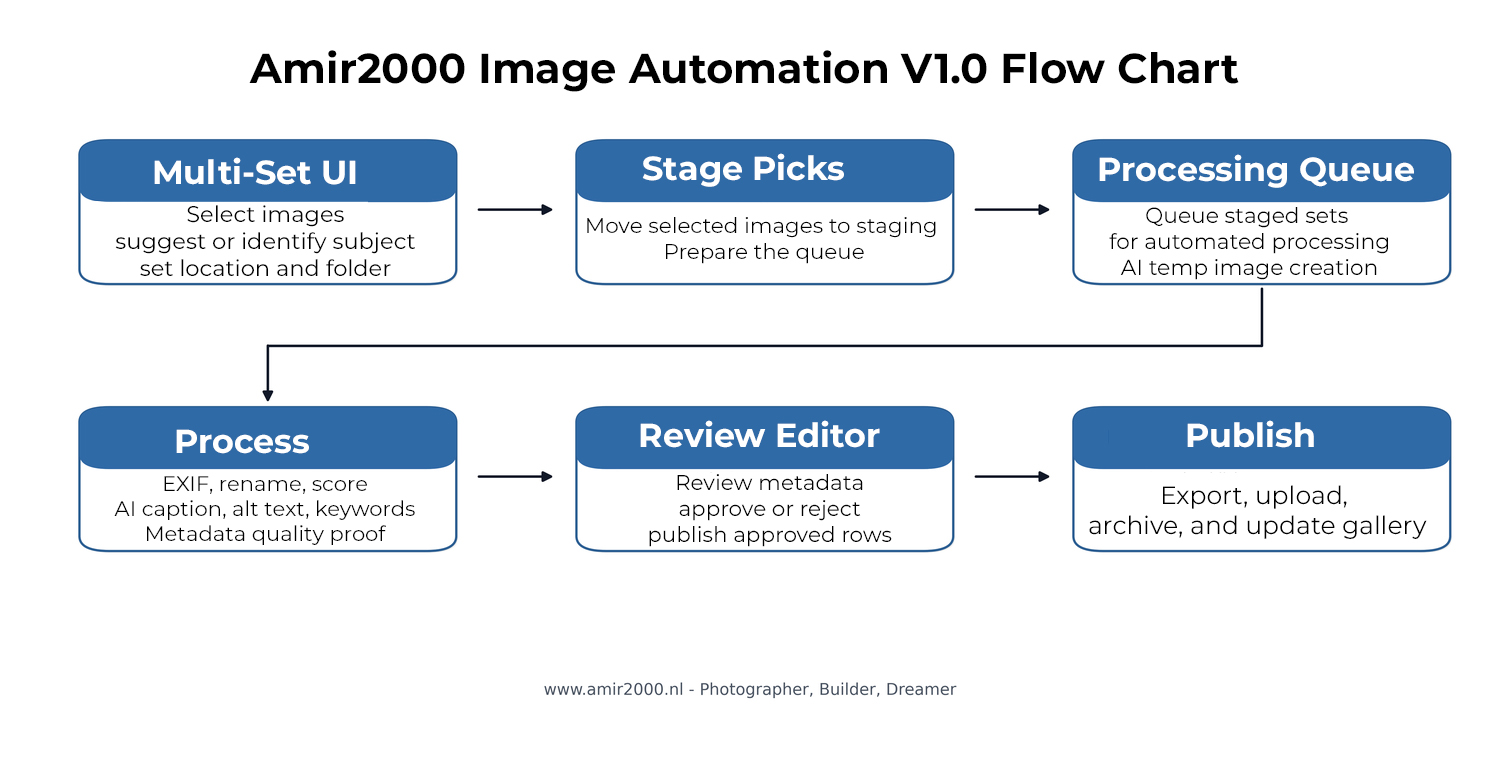
Workflow figure: V1.0 stage flow from set intake through metadata proof, review, publish, and gallery update.
2.2 Stage sequence in main_set.py
- Validate sets - checks selected set inputs before any write operations.
- Prepare DB and copy to incoming - establishes working context and staged local inputs.
- Extract EXIF and initial metadata - seeds technical metadata used downstream.
- Insert or refresh review rows - creates or updates queue rows in
review_queue. - AI quality scoring - computes quality signals for later review decisions and persists all score fields (including
brisque_scoreandclip_aesthetic_score) with deterministic fallback values when needed. - Resize images for Ollama - writes temporary model-ready files and tracks
ollama_path. - Caption, keywords, and metadata proof - uses a primary model with optional row-level fallback retries (when fallback is configured), classifier-assisted hints (when enabled), identifier evidence, strict duplicate controls, evidence-first keyword guardrails, filename/time-of-day consistency checks, malformed phrase rejection, bounded repair attempts, and
metadata_qualityproof writes for upload-safe fields. Automated repair is limited to caption, alt text, and keywords; it preserves the selected subject, location, and folder/category. - Open review editor - transitions into manual review and approval workflow.

Startup runtime check in the stage log: model processor mode, context, and VRAM are printed before execution continues.
2.3 Runtime data flow
- Normalize source files into staging paths for deterministic processing.
- Store operational source-of-truth records in
data/review.db, tablereview_queue. - Stage helper scripts into
data/_runtime_scriptsduring EXE runs to avoid frozen-runtime DLL conflicts. - Read
ollama_path(fallbackPath) per row during caption generation. - Run caption prefill with row-level retry semantics: optional fallback model is used only when configured and when the primary model fails that row.
- Run metadata proof and bounded repair before review so empty fields, duplicate text, and unsupported claims are caught before operator approval.
- Treat identifier output as evidence-led assistance: biology and aircraft routes seek specificity only when visual evidence supports it; unresolved or mixed selections remain review decisions.
- Write proof output to
metadata_quality, separating generated/current metadata from accepted upload metadata. - Run a post-prefill QC scan for duplicates/suspicious text and write report output to
data/prefill_qc_last.jsonbefore review editor opens. - Use Stage 6 watchdog guards: idle/hard timeout protection terminates stuck child workers, retries are automatic, and repeated native crash rows are quarantined as
Review_Status=ErrorandQC_Status=PrefillNativeCrashso the batch can continue. - Enforce evidence-only keyword behavior for geography, terrain, and scene terms; context must not be replaced by generic or unsupported claims.
- Apply context guardrails to keep metadata aligned with selected location, visible scene, and filename time-of-day cues such as
sunrise/sunset. - Use category-aware fallback wording only as a last-resort reliability path. It must preserve the selected subject, location, and category and never replace image-specific inference or operator review.
- Apply sentence normalization and style rejection to reduce malformed phrasing (for example broken hyphen compounds or malformed starts in generated caption/alt text).
- Write final text fields, quality decisions, and publish intent from editor updates.
- Sync approved rows to remote assets and DB while updating local mirror state.
2.4 Review and publish path after stage 8
- Operator validates and edits caption, alt text, keywords, and filename fields (with shared dictionary spellcheck available in the text fields).
- Operator can trigger row-level regeneration via Generate; regenerate flow checks pending-row duplicates before persisting updated Caption, alt text, and Keywords while preserving selected Subject, Location, and Folder/category.
- Each row receives a decision status (approved or rejected).
- Publish action targets approved rows only.
- Uploader sends full image and thumbnail outputs to configured FTP destinations.
- Tagged source images are converted to sRGB for website export; both the generated full image and thumbnail carry an embedded sRGB ICC profile while originals remain unchanged.
- MySQL upsert is applied using
File_Nameas stable key. - Local mirror IDs and publish state are synchronized after remote write success.
- Publish completion uses one final confirmation dialog; clicking OK closes the review window.
- Temporary model artifacts are cleaned when publish completes without blocking errors.
2.5 Queue statuses and transition intent
Primary fields:
QC_Status- quality class from automated scoring and review updates.Review_Status- lifecycle decision such as Pending, Approved, Rejected, Published, or Error.
Transition rule: no row enters publish state without explicit review approval. Automated proof validates structural, duplication, and context rules; it does not replace the operator's semantic review of the image and its metadata.
2.6 Failure handling and rollback behavior
Handle failures as session events, not isolated row edits. When a blocking error occurs, rollback logic restores operational consistency so a clean rerun is possible.
- Remove inserted session rows from the active review queue when required.
- Restore moved or staged files to original folders.
- Release reserved filenames from
data/used_filenames.json. - Preserve failure details in logs for diagnosis before rerun.
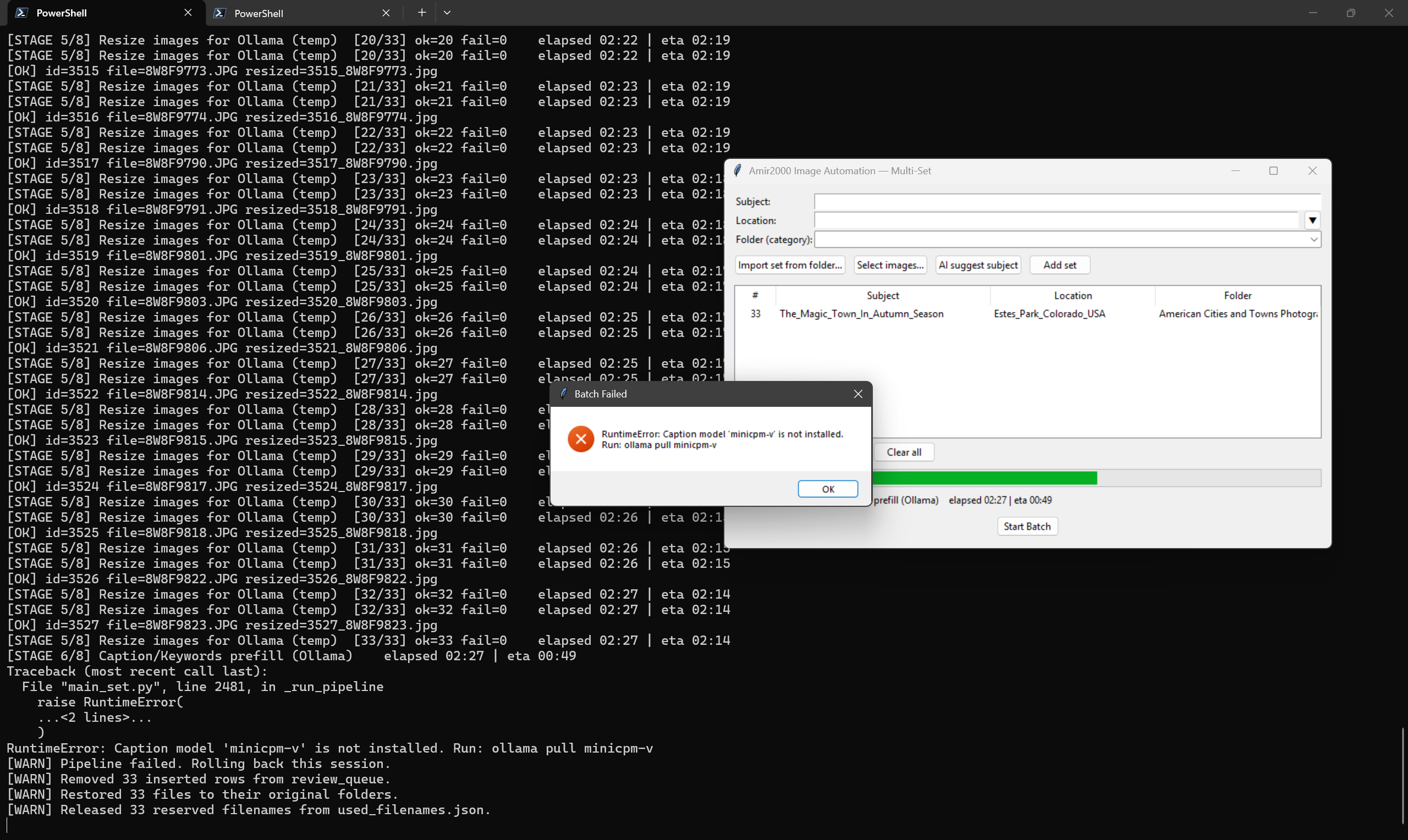
Rollback figure: blocking caption-model error followed by automated session cleanup.
2.7 Run artifacts and logs
- Pipeline log:
logs/latest_run.log(or beside EXE in frozen builds). - Startup runtime line in pipeline log:
[INFO] Ollama startup check: model=... processor=GPU/CPU context=... vram=.... - Uploader log:
logs/db_uploader.log. - Runtime callback crash log:
data/crash_runtime.log. - Prefill QC report:
data/prefill_qc_last.json. - Metadata proof table:
metadata_qualityin local SQLite bootstrap schema. - Run summary:
data/run_log.txt. - Frozen helper staging path:
data/_runtime_scripts/. - Temporary model files:
data/ollama_tmp/run_*.
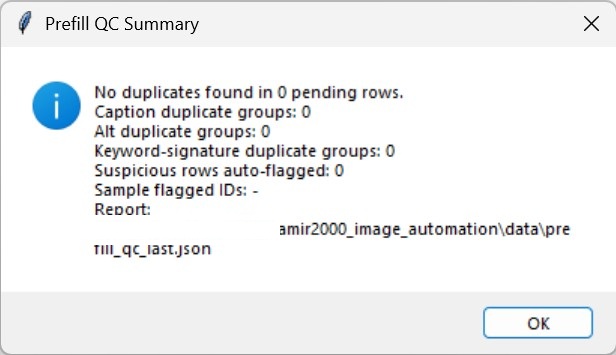
Prefill QC summary output used before entering review editor.
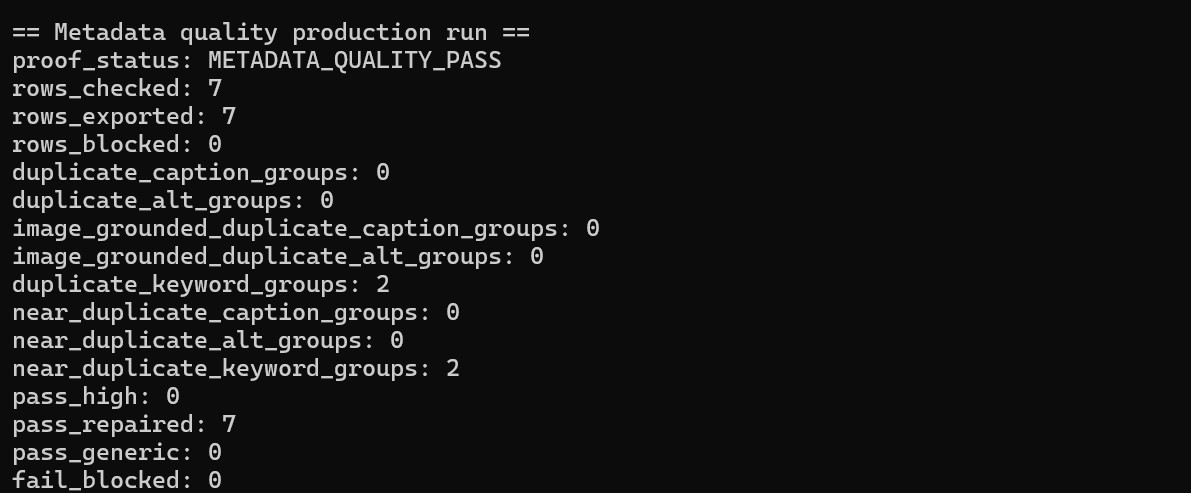
Metadata quality proof summary: accepted rows are exported only when the proof stage has zero blocked rows. This proof is a quality gate, not a substitute for the operator's semantic review.
2.8 Continuation path
Step 2 describes execution behavior. Step 3 defines daily operation, checklists, and recovery procedure for production use.